AvatarCraft
AI – AI Talking Photo Generator | Make Photos Talk & Sing.

- Category
- Avatars
- Alternatives
- 6 similar tools
- Last updated
- 2 weeks ago
- Source
- Official site ↗︎
AI Collection Top Picks
Avatars Category Picks


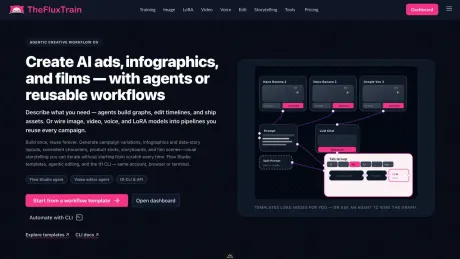
aiselfi.es
Create AI-generated profile pictures quickly and easily. Use our tool to create free, personalized AI profile pictures in minutes. Try it out → aiselfi.es
About AvatarCraft
AvatarCraft AI is an AI talking photo generator. Add a script, recording or song to one photo and get a lip-synced talking or singing video. 30 free credits.
AvatarCraft's Pricing Plans
AvatarCraft may change prices at any time. Here's our latest information:
Pricing
Pricing
- New users can start with a free plan that includes 30 credits for creating videos.
Frequently asked questions
What is AvatarCraft used for?
AvatarCraft AI – AI Talking Photo Generator | Make Photos Talk & Sing.Is AvatarCraft free?
Pricing for AvatarCraft varies — see the Pricing section for details.What are alternatives to AvatarCraft?
Top alternatives to AvatarCraft include aiselfi.es, Photo AI, HairstyleAI, Real Photo AI, CustomQR AI.Where can I get AvatarCraft?
AvatarCraft is available at https://avatarcraft.ai/.What category is AvatarCraft in?
AvatarCraft is listed in Avatars.What type of photos should I upload?
We suggest providing 10 close-up face shots, 4 upper-body photos, 3 side profile photos, and 3 full-body photos. Aim for a diverse collection, featuring various facial expressions, clothes, backgrounds, and perspectives. Ensure that no other individuals or animals are present, aside from the primary subject. Avoid using sunglasses or anything that covers your face. If you wear makeup, opt for a minimalistic approach to avoid exaggeration in the avatars. Please refrain from uploading nudes; however, swimwear and underwear are acceptable.How long does it take to receive my avatar?
At present, it takes approximately 3-6 hours. However, the time may vary depending on the number of orders.How does AvatarCraft handle my photos and data privacy?
We use your photos solely for training a unique AI model that generates your avatars. Your model is exclusive to you and is not shared with others. All input photos and AI models are deleted from our servers within 7 days. We prioritize your privacy and never sell your data. Be cautious when using other profile photo and avatar generating apps, as many retain your data indefinitely for mining purposes. This potentially enables them to generate any image, including deep fakes, featuring your face. Some services may even have affiliations with foreign governments, posing a risk to your data security.How closely will the avatars resemble me?
Significantly! The more diverse and high-quality your photos are, the easier it is for the AI to grasp your facial and body features, resulting in avatars that closely mirror your appearance.Which payment methods are accepted?
We accept a wide range of payment options, including credit or debit cards, MasterCard, VISA, American Express, Discovery, UnionPay and Paypal.Can I get a refund?
Yes, we can refund purchases made within the first 14 days if you haven’t trained the AI yet. After14 days or once a plan is used, it is no longer eligible for a refund. Please refer to our Terms of Service for details.Can I get an invoice?
Certainly! You can receive an invoice for your purchase. Simply navigate to the order page after completing your transaction, then click on the Invoice button.What file format of photos are accepted?
Currently, we accept JPG, PNG, WebP, HEIC, JFIF, TIFF, and RAW formats. Please note that AVIF and GIF formats are not supported!What is an AI talking photo generator?
An AI talking photo generator animates the face in a still photo so it speaks or sings along to audio, with the lips synced to the voice. AvatarCraft AI does this from one photo plus a typed script, an uploaded recording, or a song.How do I make a photo talk with AvatarCraft AI?
Upload a photo with one clear, front-facing face or pick one of 160+ preset avatars, add audio from text to speech, an uploaded file, or a recording, then generate. Each video uses 3 to 60 seconds of audio; the free plan allows up to 20 seconds. A 10-second video usually takes a few minutes.Can I make a photo sing?
Yes. Upload a song you created, licensed, or have permission to use, and the face in the photo sings along. Try the AI singing photo generator .What photos work best?
Use a sharp photo (JPG, PNG, or WebP up to 10MB) with one clear, front-facing face and an unobstructed mouth. Portraits, illustrations, pets, and cartoon characters all work. Only use photos you own or have permission to use.What voices and languages are supported?
Text to speech offers 330+ voices in 20+ languages , including English, Spanish, Portuguese, Chinese, Japanese, Korean, French, and German. You can clone your own voice on the Clone tab of text to speech , or upload or record audio in any language.How much does it cost?
Videos cost 1 credit per second at 540p and 2 credits per second at 720p, which requires a paid plan. New accounts get 30 free credits, enough for one 20-second video at 540p. See pricing .Can I use the videos commercially?
Yes. Generated videos can be used for marketing, social media, training, and business content on paid plans. Free users are limited to personal, non-commercial use. See our Terms of Service for full details.What can't AvatarCraft AI do?
Each video animates one face, so there are no multi-speaker scenes. There is no batch generation, no video translation or dubbing, and no separate controls for speaking speed, pitch, or emotion; pick a different voice instead.
Compare AvatarCraft with…
Pick any tool to see a structured side-by-side: pricing, deployment, capabilities, and content policy.