
Image UpscalerFree
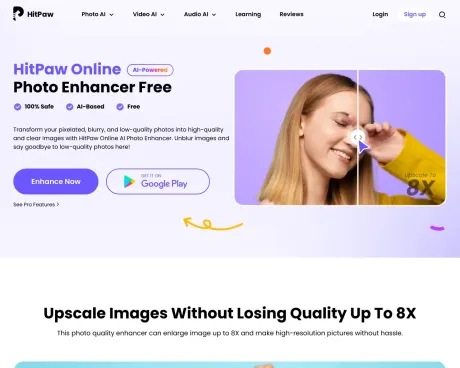
HitPaw Online Photo Enhancer
AI Photo Enhancer: Unblur Image Online to 8K Clear | HitPaw.
- Category
- Image Upscaler
- Pricing
- Free
- Alternatives
- 6 similar tools
- Last updated
- 2 weeks ago
- Source
- Official site ↗︎
AI Collection Top Picks

Image Upscaler Category Picks

AVC AI
Online AI Image Enhancer that Improves Photo Quality by Upscaling, Denoising, Restoring, Face Refinement, and More
About HitPaw Online Photo Enhancer
Unblur and upscale images up to 8X losslessly with HitPaw AI. Enhance photos to 8K/16K clarity online for free. Fix blurry pictures without losing quality now!
Frequently asked questions
What is HitPaw Online Photo Enhancer used for?
AI Photo Enhancer: Unblur Image Online to 8K Clear | HitPaw.Is HitPaw Online Photo Enhancer free?
HitPaw Online Photo Enhancer is free to use.What are alternatives to HitPaw Online Photo Enhancer?
Top alternatives to HitPaw Online Photo Enhancer include AVCLabs Photo Enhancer AI, AVC AI, Imgupscaler, AI Image Enlarger, Waifu XL.Where can I get HitPaw Online Photo Enhancer?
HitPaw Online Photo Enhancer is available at https://online.hitpaw.com/online-photo-enhancer.html.What category is HitPaw Online Photo Enhancer in?
HitPaw Online Photo Enhancer is listed in Image Upscaler.What is the process for enhancing a photo online?
To enhance photos online, you can utilize the HitPaw Online AI Photo Enhancer, an AI-powered tool designed for this purpose. It has the capability to significantly improve photos online and upscale them up to 8X without any loss of quality.Is the HitPaw Online AI Photo Enhancer free to use?
Yes, the HitPaw Online AI Photo Enhancer allows you to enhance photos online for free. It offers a free model for users. However, for superior photo quality, we recommend using the advanced AI model with a cost-effective pricing plan.Is the HitPaw Online AI Photo Enhancer secure?
Absolutely. The HitPaw Online AI Photo Enhancer ensures the privacy of its users by refraining from collecting any user data. Moreover, any uploaded images are automatically deleted after 48 hours.Is there a mobile app for photo enhancement?
Indeed, HitPaw provides a mobile app for photo enhancement called AI Photo Enhancer - HitPaw This app is available for Android devices, allowing users to easily upscale images and access additional features such as automatic beauty enhancements, colorization, and cartoonization.How can I enhance a photo on my PC?
For photo enhancement on your PC, you can utilize the top-notch HitPaw Photo Enhancer software, compatible with both Windows and Mac operating systems. Follow these steps: * Visit the official page of HitPaw Photo Enhancer software and install it on your desktop. * Upload your images and select the appropriate AI model. * Preview the results and export your enhanced images to your desktop.What is the solution for fixing a pixelated image?
To remove pixelation from an image, you can take advantage of the HitPaw Online AI Photo Enhancer, which effectively enhances images and eliminates noise. * Open the HitPaw Online AI Photo Enhancer and upload your pixelated image. * The tool will automatically enhance the pixelated image. * After a few seconds, preview the enhanced image and proceed to download it.How to increase resolution of image?
HitPaw Online Photo Enhancer is a picture upscaler that uses AI to enhance pictures and improve photo resolution by up to 8X. Just upload your image, enable the AI Upscale model, and get high-resolution results with one tap.How to unblur an image online?
HitPaw Online Photo Enhancer uses advanced AI technology to unblur images, especially excelling in face enhancement effortlessly. It works great for improving blurry photos, helping you get clearer images online for free.Is HitPaw Online Photo Enhancer free and safe to use?
Yes, you can use it to enhance photos online for free with HitPaw Online AI Photo Enhancer. We provide a free model for you. But for better photo quality, we recommend the advanced AI model with a cost-effective pricing plan.How to increase resolution of images on phone?
HitPaw offers a photo enhancer app, named AI Marvels - HitPaw, so you can easily upscale images and fix blurry images on Android and iOS.How to enhance images quality in bulk?
HitPaw offers the best photo enhancer software to batch enhance images perfectly, available on both Windows and Mac. Head to the official page of HitPaw FotorPea photo enhancer software and install it on your desktop.How to fix a pixelated image?
To get rid of pixelation in your image, you can use HitPaw Online AI Photo Enhancer to enhance and remove noise from images.Is there a free online photo enhancer with no watermark?
Yes. HitPaw Online AI Photo Enhancer lets you enhance photos online for free without adding a watermark to your images.1. How to increase resolution of image?
HitPaw Online Photo Enhancer is a picture upscaler that uses AI to enhance pictures and improve photo resolution by up to 8X. Just upload your image, enable the AI Upscale model, and get high-resolution results with one tap.2. How to unblur an image online?
HitPaw Online Photo Enhancer uses advanced AI technology to unblur images, especially excelling in face enhancement effortlessly. It works great for improving blurry photos, helping you get clearer images online for free.3. Is HitPaw Online Photo Enhancer free and safe to use?
Yes, you can use it to enhance photos online for free with HitPaw Online AI Photo Enhancer. We provide a free model for you. But for better photo quality, we recommend the advanced AI model with a cost-effective pricing plan. Moreover, HitPaw Online will never collect any user's data, and your uploaded images will be deleted after 48 hours.4. How to increase resolution of images on phone?
HitPaw offers a photo enhancer app, named AI Marvels - HitPaw, so you can easily upscale images and fix blurry images on Android and iOS. More than a photo enhancer, it also features automatic beauty, colorized photos, cartoonize images and more.5. How to enhance images quality in bulk?
You can use our free online photo enhancer to upload and process images one by one instantly. For large batch processing without limits, HitPaw offers the best photo enhancer software to batch enhance images perfectly, available on both Windows and Mac. Head to the official page of HitPaw FotorPea photo enhancer software and install it on your desktop. Drag & drop your photos—our AI automatically matches the best model for each image. Preview and export all high-resolution images in bulk with one click.6. How to fix a pixelated image?
To get rid of pixelation in your image, you can use HitPaw Online AI Photo Enhancer to enhance and remove noise from images. Open HitPaw Online AI Photo Enhancer, and upload your pixelated image. Your pixelated image will be automatically enhanced. Preview the unpixelated image after a few seconds, and download it finally.7. Is there a free online photo enhancer with no watermark?
Yes. HitPaw Online AI Photo Enhancer lets you enhance photos online for free without adding a watermark to your images. Simply upload your photo, choose an AI enhancement model such as Upscale, Face, or Denoise, and download the enhanced result in just a few clicks.
Compare HitPaw Online Photo Enhancer with…
Pick any tool to see a structured side-by-side: pricing, deployment, capabilities, and content policy.


